
How to Track Your Spending (and Actually Keep Doing It)
To track your spending, write down every purchase on the day you make it, give each one a category, and once a month add up the categories and compare them with what you planned. That's the whole method. The tool matters much less than the habit: paper, a spreadsheet and an app all work if you keep using them.
The short version: pick one place to record spending and use only that. Start with 8 to 12 categories. Log each purchase when you pay, or in one 2-minute check-in every evening. Once a month, total each category, compare it with your plan, and change one thing for next month. If a full month feels like too much, start with one or two weeks.
That last tip comes from the Consumer Financial Protection Bureau, whose free spending tracker worksheet is built around the same steps. This post is about the method and the habit, not financial advice.
Why tracking for a month is worth it
Tracking is the step before budgeting. You can't plan your spending well until you know where the money goes now, and most people's guess is off in the small stuff. The CFPB puts it plainly: many people who track for a month "discover that they're spending money in small ways that add up and sometimes don't match their priorities."
A full month matters because many bills only show up once a month. A week of tracking catches your coffee and groceries but can miss the phone bill, the insurance and the subscription that renews on the 23rd. The CFPB suggests a month, "rather than just a week or two," because it shows all your income and expenses in one place. A shorter trial is still better than nothing.
Step 1: Pick one place to track
There are three common ways to do it. Each works; the best one is the one you'll still be using in March.
| Method | Good for | Watch out for |
|---|---|---|
| Paper | No setup, no screens, easy to start today | Doing the math by hand; losing the notebook |
| Spreadsheet | Full control, totals and charts you design | Easy to fall behind when it's only open on a laptop |
| App | Logging at the till, totals done for you | Picking one you trust, and either typing or linking accounts |
Paper. A small notebook or the CFPB worksheet. The CFPB's version is an envelope: every time you spend, put the receipt in it, and if the receipt doesn't say what you bought, write it on the receipt. No receipt? Write the amount and the item on a slip of paper and add it to the pile. At the end of each week, sort the receipts into categories and total them.
Spreadsheet. One row per purchase with four columns: date, what, category, amount. A pivot table or a SUMIF per category gives the monthly totals. Spreadsheets are great for the monthly review and weak for the daily habit, because you rarely have one open when you're paying for lunch.
App. Your phone is with you when you spend, so logging can happen in the moment. Some apps link to your bank and import transactions automatically; others, like Tally, are manual, which means a few taps per purchase but also that you notice each one. If you use an app, the CFPB tracker suggests reading up on protecting your information in money apps first.
Whichever you choose, use only one. Half your spending in a notebook and half in an app means neither total is right.
Step 2: Set up a short list of categories
Categories turn a pile of purchases into an answer: where did the money go? Too few and you learn nothing ("Stuff: $2,140"); too many and every purchase needs a decision. Somewhere around 8 to 12 is a comfortable start.
The CFPB's tracker uses 12, which make a good default:
| Category | What goes in it |
|---|---|
| Housing + utilities | Rent or mortgage, electricity, gas, water, internet |
| Groceries + supplies | Food for home, household supplies |
| Eating out | Meals and drinks bought outside the home |
| Transport | Gas, car payment, repairs, transit fares, rides |
| Cell phone | Your phone plan and anything phone-related |
| Health | Co-payments, medication, eye and dental care |
| Entertainment + personal care | Movies, streaming, subscriptions, haircuts |
| Debt payments | Credit card and loan payments |
| Education + childcare | Childcare, school supplies and fees |
| Pets | Food, vet bills |
| Helping others | Donations, gifts |
| Other | Household items, job costs, savings |
Adjust it to your life. No pets? Drop it. Coffee is your thing? Give it its own category so you can see it. Two rules keep categories useful:
- Decide the gray areas once. Is a takeout pizza "Eating out" or "Groceries"? It doesn't matter which, as long as it's the same every time.
- Watch the "Other" pile. If one kind of purchase keeps landing there, give it its own category.
Step 3: The 2-minute daily habit
Consumer.gov's guide to making a budget describes the routine in one line: "Then each day, write down what you spent." The trick is making that small enough that you actually do it.
Log when you pay, or log once a day. Logging right after you pay is the most accurate, because you remember what it was. If that's not you, pick a fixed moment every day (after dinner, on the train home, while the kettle boils) and log the day in one go. Two minutes is usually enough: open your banking app or your receipts, and copy each purchase across.
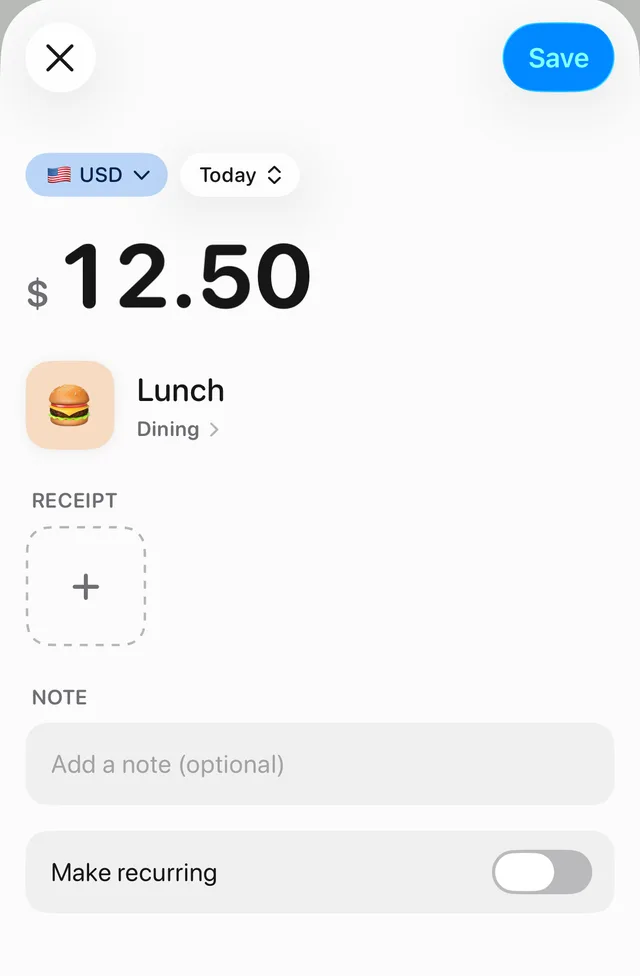
Keep each entry tiny. Amount, a few words, a category. "12.50, lunch, Eating out" is a perfect entry. Notes are optional.
Set up repeating bills once. Rent, phone, insurance and subscriptions don't need daily attention. On paper, write them in at the start of the month. In a spreadsheet, copy last month's rows. In an app, use recurring entries if it has them.
Don't forget cash and shared bills. Cash is the easiest to miss because there's no statement to catch it later; jot it down as you spend it. If you share bills with roommates or a partner, the CFPB tracker reminds you to include those too. Count your share, not the whole bill: if you paid $90 for groceries for three people, $30 of it is yours.
Missed a few days? Don't start over. Fill the gap from your bank and card statements, guess the cash, and carry on. A month with a rough patch is still far more useful than an abandoned one.
Step 4: The monthly review
Once a month, sit down for a short review. Consumer.gov's version: "At the end of the month, see if you spent what you planned," then use what you learned to plan next month. Here's a simple way to run it:
- Total each category. Add up the month (on paper, add the weekly totals). Add the categories together for your total spending.
- Mark the fixed costs. The CFPB suggests circling items that are the same every month, like rent, car or phone payments. These are usually your needs and obligations. What's left is where you have choices.
- Compare with your plan. If this is your first month, there's no plan yet: this month's totals become next month's starting limits.
- Check against reality. Compare your tracked total with your bank and card statements. A big gap usually means cash or a missed recurring bill.
- Pick one change. Not ten. One category to bring down, or one limit to raise because it was never realistic.
Here is a made-up month for one person, with round numbers just for illustration:
| Category | Plan | Spent | What happened |
|---|---|---|---|
| Groceries | $400 | $372 | Under |
| Eating out | $150 | $214 | Lots of work lunches |
| Transport | $120 | $96 | Under |
| Subscriptions | $45 | $61 | Two forgotten trials |
The useful outcome here isn't guilt about lunch. It's two decisions: cancel the trials, and either pack lunch twice a week or raise the eating-out plan to something honest. The CFPB's tips for managing spending say the same: compare your actual spending to your budget monthly or more often, and adjust the budget if it's regularly out of line.
Tracking your spending in Tally
Tally is best known for splitting bills, but the same tools work for one person. Here's how the method above maps onto it, including where it doesn't fit.
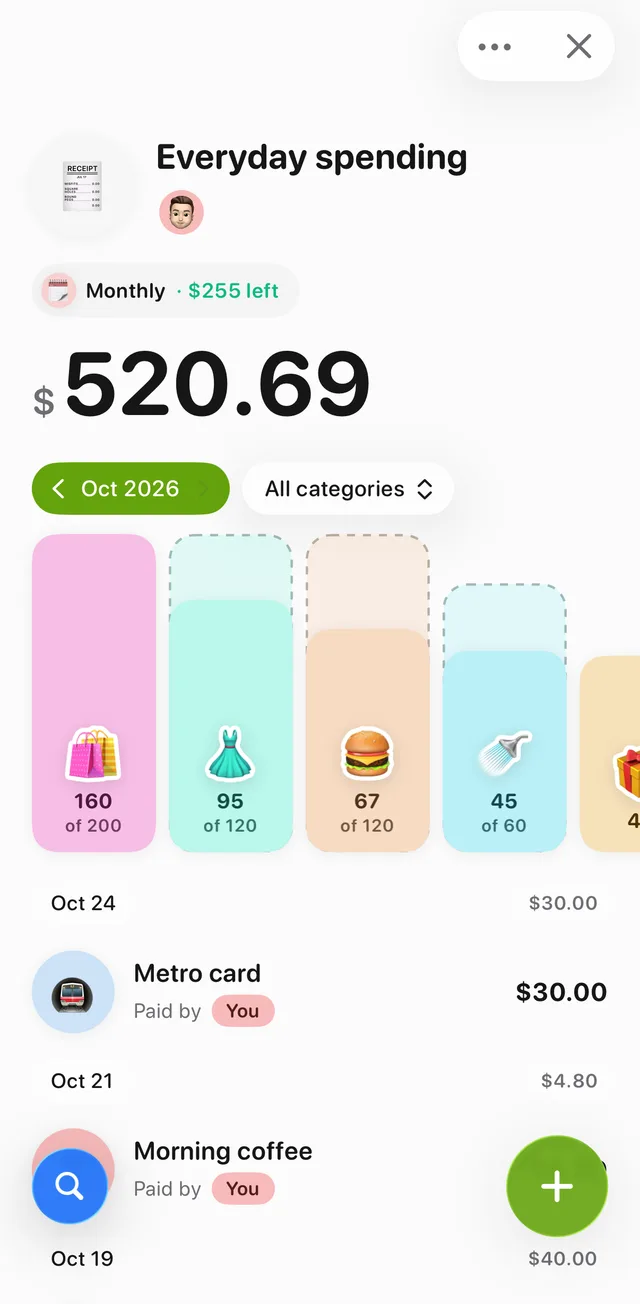
One expense for your everyday spending. In Tally, an expense is a container for transactions. Create one called something like "Everyday spending" with just you in it. On a solo expense, the payer and split options stay out of the way, so each entry is an amount, a title, a category and a date. The amount field also does simple math, handy for adding up a receipt.
Your own categories. Make the categories from Step 2 with your own names, emojis and colors. The expense shows a spend-by-category chart at the top, biggest first, so the review starts with the picture.
A month at a time. Once an expense has activity in two or more months, a month filter appears on it, so you can keep one ongoing expense and step through it month by month instead of starting a new one every month.
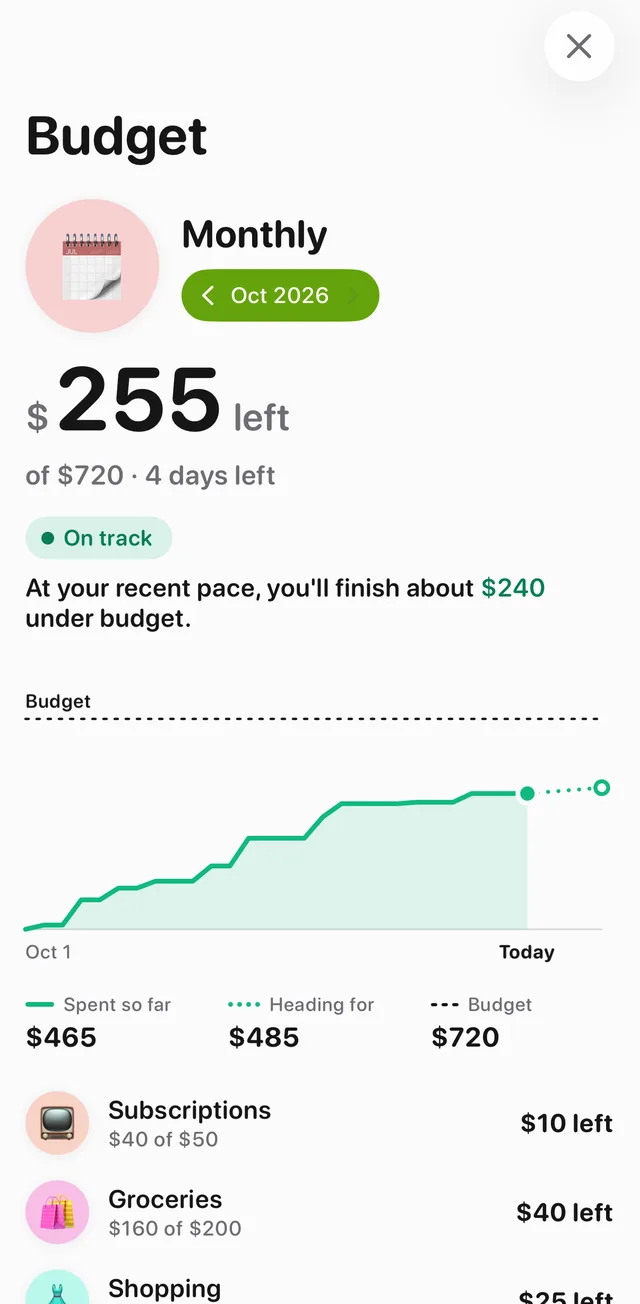
Limits per category. A budget in Tally is a set of spending limits per category that you attach to an expense. When you look at a month, the budget counts only that month's spending, so it starts fresh each month. The budget page shows what's left, a chart of spending so far against the limit, and a one-line forecast based on your recent pace. That does steps 1 and 3 of the review for you: the totals and the comparison with your plan.
Repeating bills. Recurring transactions (daily, weekly, monthly, yearly or a custom schedule) are added automatically, so rent and subscriptions log themselves.
Shared bills, counted once. If you also share an expense with roommates or a partner, the Wallet (bottom left of the Expenses page; it needs a free sign-in with Apple or Google) shows your own month across all your expenses: income you log there, plus your share of everything you spent. It's the closest thing to Step 4's total. You can also set its balance to the cash you actually hold, which is a quick way to correct for the purchases you forgot.
Where Tally is not a fit. Tally doesn't connect to your bank or card, so nothing is imported: every purchase is entered by hand (or by voice with Tally+). If you want automatic import, a bank-linked app or your bank's own spending view will suit you better. Tally also doesn't export to a spreadsheet yet, so if your review lives in a spreadsheet, keep the spreadsheet as your one place.
On the free plan you can create up to 5 expenses and 2 budgets, which is enough for this whole setup. Tally+ adds unlimited expenses and budgets, voice entry ("12 for coffee") and smart category suggestions.
Keeping it going
Most people don't stop tracking because the method is wrong. They stop because a busy week breaks the chain and catching up feels like a chore. A few things help:
- Make the first goal small. One or two weeks, as the CFPB suggests. Then decide whether to keep going.
- Attach it to something you already do. The 2-minute log works best tied to a daily routine.
- Keep the review short and kind. The point is information, not a report card. Look for one change.
- Expect imperfect data. A total that's within a few dollars of your bank statement is plenty to make decisions with.
If some of your spending is shared, these guides go deeper: how to split bills with roommates, how to split bills as a couple and how to split travel expenses with friends.

Tally: expense tracker and bill splitter
Log what you spend, split bills with friends in any currency, and see who owes whom when it's time to settle up. Set category budgets and watch them as you go. Free to start.

Common questions
What is the easiest way to track spending?
Pick the tool that's already with you when you spend, usually your phone, and log each purchase with just an amount, a few words and a category. Keep the categories few, and do a short review once a month.
How do I track my spending on paper?
Keep an envelope for receipts and write what you bought on any receipt that doesn't say. Once a week, total the receipts by category; at the end of the month, add the weekly totals. The CFPB's free spending tracker worksheet has a ready-made table for this.
How often should I review my spending?
A quick look weekly and a proper review monthly works for most people. The monthly review is where you compare with your plan and pick one change for next month.
Should I track cash purchases?
Yes. Cash is the spending that's easiest to forget, because no statement will remind you later. Write it down when you spend it, or log it in your daily 2-minute check-in.
Is there a free app to track spending on iPhone?
Tally is free to start: create an expense for your everyday spending, log purchases with your own categories and set category limits with a budget. It doesn't link to your bank, so you enter purchases yourself.